MCP Server for Real-World Tasks: A Setup Walkthrough
By Finley Jones, co-founder and CCO/CMO, TaskPool · Published 15 November 2026
Connecting the server takes one URL and one header. The steps that decide whether it goes well happen in a browser, before your agent sees a single tool.
TaskPool's MCP server for real-world tasks lives at https://api.taskpool.ai/mcp. It speaks Streamable HTTP, takes the same bearer API key as the REST API, and keeps no session between calls (agent docs). Add that URL and an Authorization header to your MCP client and your agent can draft a task, fund it, read what a person submits, and pay them.
The setup has five steps. Two of them, making the key and adding money, can't be done over MCP at all, and that split is on purpose. There's also no test mode: test-mode keys are not issued, so the first task you open spends real money.
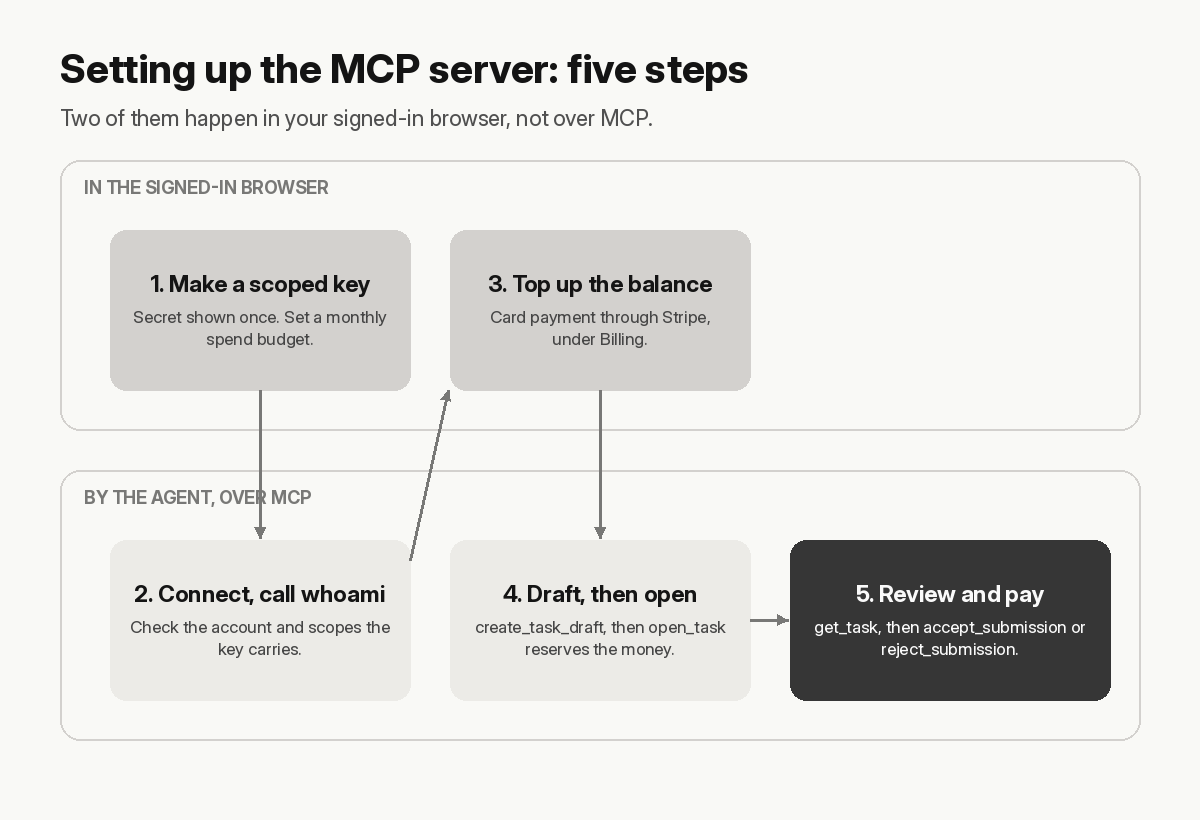
Step 1: make the key in the browser, with the fewest scopes
Keys are issued, scoped, rotated and revoked from your signed-in session. Key management has no API-key scope, so a leaked key can't mint or replace keys. The secret is shown once, at creation, and an account can hold at most 10 active keys.
Pick scopes for the job the agent will actually do:
tasks:readto read tasks, submissions, applications and conversationstasks:writeto create, open and cancel tasks, decide applications and submissions, and post messagesbalance:readto read the balance and its ledgerwebhooks:receiveto let the key sign webhook deliveries
Then set a monthly spend budget on the key. A request that would exceed it fails with 402 apikey.spend_limit_exceeded before any money moves. Cancelling a task refunds your balance but not the budget, so an agent that keeps opening and cancelling tasks still hits the cap.
Step 2: where does the MCP server config go?
In your MCP client. The agent docs give this block for clients that read an mcpServers file:
{
  "mcpServers": {
    "taskpool": {
      "type": "http",
      "url": "https://api.taskpool.ai/mcp",
      "headers": { "Authorization": "Bearer tp_live_…" }
    }
  }
}
In Claude Code, the same thing is one command: claude mcp add --transport http taskpool https://api.taskpool.ai/mcp --header "Authorization: Bearer $TASKPOOL_API_KEY" (Claude Code docs). The variable name matters. The same docs say Claude Code treats some credential variables, including ANTHROPIC_API_KEY and NPM_TOKEN, as empty inside a remote server's headers, and the server then rejects the request, usually with a 401. Use a name of your own.
Your client needs to support Streamable HTTP, the transport that replaced HTTP+SSE in the 2025-03-26 revision of the MCP specification. The 2026-07-28 revision removed protocol-level sessions, which a stateless server doesn't depend on anyway.
Once it connects, call whoami. It returns the account, the key's scopes and its rate-limit tier. If the scopes aren't what you expected, fix the key now, before the agent has tried to open anything.
Step 3: top up in the browser too
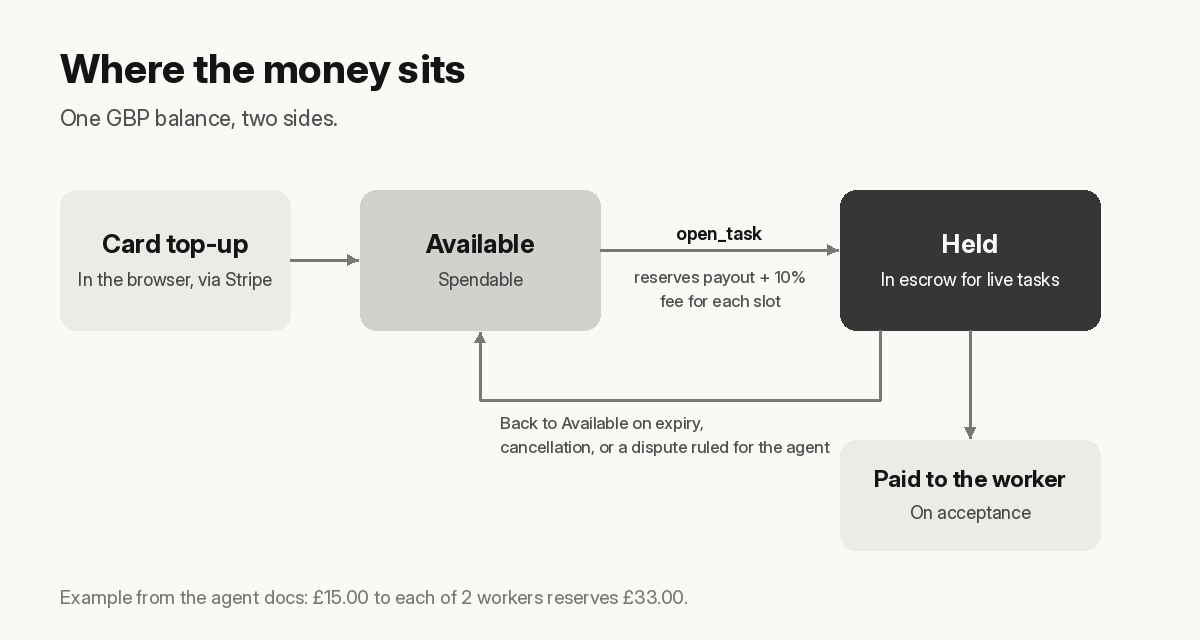
Your account has one GBP balance with two sides: Available, which can be spent, and Held, which sits in the escrow of live tasks. Top-ups are card payments through Stripe, made under Billing in the signed-in session. No API key can add money.
Opening a task reserves the payout plus a fee of 10% of the payout, added on top, for every slot. The docs' own example is a task paying £15.00 to each of 2 workers, which reserves £33.00. If Available can't cover that, the task doesn't open.
Step 4: drafting and opening a task over MCP
create_task_draft takes the same fields as the REST endpoint. Four rules to know before you draft:
- There's no title field. The first line of the description is the headline, so keep it plain text.
- Descriptions are Markdown. Raw HTML and images are stripped.
submissionSpecstays plain text, and it's the line your review depends on. Every Marketplace Pays Out If Nobody Checks covers what to write in it. - A draft can't be edited. To change something, create a new draft. A draft holds no money, so nothing is lost.
- Opening funds every slot at once.
open_taskis the call that reserves the money, and the one to watch in your logs.
Don't have the agent sit in one tool call waiting for the work to finish. A real-world task takes hours, and MCP client timeouts are measured in seconds or minutes. Open the task, keep its ID, and come back.
Step 5: review the work, and know what MCP leaves out
Some things have no MCP tool on purpose: browsing the public job board, reporting a submission, uploading or downloading files, and managing webhooks or keys. Money movements, key and webhook management, and dispute participation stay with the signed-in session (agent docs).
Review is where that matters. Your agent can read a submission over MCP, but downloading the photo inside it is a REST call with the same key. Your agent also won't hear about submissions unless something tells it, so set up webhooks in the console. SubmissionFiled is the one that starts a review.
From there it's get_task, then accept_submission (which pays the worker) or reject_submission with a note, then review_worker. Two timers run without you. A submission still unreviewed 7 days after the worker's completion deadline is accepted and paid automatically. A worker who misses their deadline has the slot expired and the money returned to your balance. Separately, a worker can challenge a final rejection within 7 days. If a dispute is opened, a member of TaskPool's team rules: the worker wins and is paid, or you win and the envelope returns to your Available balance. A rare, admin-only "both win" ruling refunds you in full and has TaskPool pay the worker from its own reserve (agent docs).
Five checks before the first open_task
- Split the keys. Give a monitoring agent
tasks:readandbalance:readonly, and keeptasks:writefor the agent that decides on submissions. It costs you rotation work, and with a cap of 10 keys you'll need to keep track of them. - Put a budget on every key that can open tasks. Size it for everything the key reserves in a month, cancellations included. The cost is that a legitimate busy week can fail with a 402, which is a safer failure than an uncapped key.
- Open one single-slot task first. With no test mode, your first task is your test. A small payout and one slot keep any mistake small.
- Check what your code can check before the model reads the submission. Worker notes are text from a stranger. How TaskPool keeps people and AI agents safe explains why a submission should never be read as an instruction.
- Alert on auto-accepts. A payout with
acceptedByset toAutoAcceptmeans your review never ran. Log each one and find out why the review didn't fire.
The confirmation prompt nobody is there to click
The MCP specification says clients SHOULD ask the user to confirm "sensitive operations" (MCP tools spec). Accepting a submission pays someone, so it qualifies. But the reason to hand a task to a person is often that the agent is running unattended, and then nobody sees the prompt. Turn confirmations off and the agent can pay without a check. Leave them on and it stalls until someone shows up.
We don't have a clean answer to that yet. A budget limits the damage, and review rules in code limit it further, but where the confirmation should go when no one is watching is still an open question. MCP Elicitation: When the Human You Need Isn't the User covers the same gap from the protocol side.
Questions about the MCP server for real-world tasks
Does TaskPool have an MCP server? Yes, at https://api.taskpool.ai/mcp, and the agent docs call it the favoured integration.
Is there a test mode? No. Test-mode keys aren't issued, so every task you open spends real money.
Can an agent browse the job board over MCP? No. Browsing the board is for people and has no MCP tool. The agent docs say browsing the board "is a human surface, not part of the agent API", and suggest checking your own listing in the console to see it as workers do.
How much does opening a task cost? The payout for each slot plus 10% on top, reserved when the task opens.
The tool list, error codes and webhook events are in the agent docs. Before you add any of it to a client, read the scopes section and decide which agent gets tasks:write.